Wednesday, March 2, 2011

RAM8

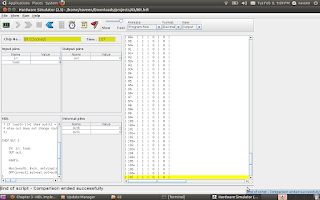
RAM8:is a memory unit of 8 registers joined together to store 16*8 bits (16 byte). Based on the address (3bits) ,the Dmux8way device control the load signal for each Registers.

CHIP RAM8 {

IN in[16], load, address[3];
OUT out[16];

PARTS:

// load given as input of 8 way Demultipelxer so that 'load' is seperated to control each Registers

DMux8Way(in=load, sel=address, a=a, b=b, c=c, d=d, e=e, f=f, g=g, h=h);

/* 16-Bit register, load is given as each seperated lines

* If load[t-1]=1 then out[t] = in[t-1]
*/
Register(in=in, load=a, out=aa);
Register(in=in, load=b, out=bb);
Register(in=in, load=c, out=cc);
Register(in=in, load=d, out=dd);
Register(in=in, load=e, out=ee);
Register(in=in, load=f, out=ff);
Register(in=in, load=g, out=gg);
Register(in=in, load=h, out=hh);
// 16bit outputs from each Registers connected through 16bit 8 way multiplexer in order to get the outputs based on the Address
Mux8Way16(a=aa, b=bb, c=cc, d=dd, e=ee, f=ff, g=gg, h=hh, sel=address, out=out);

}

Tuesday, February 8, 2011

How to build a Memory for a computing System

BIT STORE

The elementary functionality of a Computing System is that it should store data somewhere and should be collected it back whenever require. We can call this block as Memory unit of a computer. The Memory can be build using the sequential chip called flip-flop. Below HDL can store a bit . The small memory can Write and Read using the 'load' signal.


CHIP Bit {

IN in, load;

OUT out;

PARTS:

Mux(a=outb, b=in, sel=load,out=out1); //Mux input taken as the feedback of D-Flip Flop out

DFF(in=out1,out=out,out=outb);

}
================================================================================
Register

If a Bus(16bit) connected to 16 parallel a Bit chip ,then we can store 16bit at a time. This is known as Register.

CHIP Register {

IN in[16], load;

OUT out[16];

PARTS:

Bit(in=in[0],load=load,out=out[0]);
Bit(in=in[1],load=load,out=out[1]);
Bit(in=in[2],load=load,out=out[2]);
Bit(in=in[3],load=load,out=out[3]);
Bit(in=in[4],load=load,out=out[4]);
Bit(in=in[5],load=load,out=out[5]);
Bit(in=in[6],load=load,out=out[6]);
Bit(in=in[7],load=load,out=out[7]);
Bit(in=in[8],load=load,out=out[8]);
Bit(in=in[9],load=load,out=out[9]);
Bit(in=in[10],load=load,out=out[10]);
Bit(in=in[11],load=load,out=out[11]);
Bit(in=in[12],load=load,out=out[12]);
Bit(in=in[13],load=load,out=out[13]);
Bit(in=in[14],load=load,out=out[14]);
Bit(in=in[15],load=load,out=out[15]);

}

Thursday, February 3, 2011

ALU CHIP


ALU (Arithmetic and Logic Unit):


The basic building block for a computer is ALU which can perform the basic Arithmetic and logical operations. The Chip creation using the HDL from the basic gates(AND,NOT,MUX,ADDER..etc) gives you the in site knowledge and interest for binary number operations. The below HDL ALU chip can perform 18 operations, potentially which can compute 64.

Follow the course The Elements of Computing Systems


CHIP ALU {

IN // 16-bit inputs:

x[16], y[16],

// Control bits:

zx, // Zero the x input

nx, // Negate the x input

zy, // Zero the y input

ny, // Negate the y input

f, // Function code: 1 for add, 0 for and

no; // Negate the out output


OUT // 16-bit output

out[16],

// ALU output flags

zr, // 1 if out=0, 0 otherwise

ng; // 1 if out<0, 0 otherwise

PARTS:

Mux16(a[0..15]=x[0..15], b[0..15]=false, sel=zx, out[0..15]=x1);

Mux16(a[0..15]=y[0..15], b[0..15]=false, sel=zy, out[0..15]=y1);


Not16(in[0..15]=x1, out[0..15]=notx1);

Not16(in[0..15]=y1, out[0..15]=noty1);


Mux16(a[0..15]=x1, b[0..15]=notx1, sel=nx, out[0..15]=x2);

Mux16(a[0..15]=y1, b[0..15]=noty1, sel=ny, out=y2);

And16(a[0..15]=x2, b[0..15]=y2, out=Andxy);

Add16(a[0..15]=x2, b[0..15]=y2, out=Addxy);


Mux16(a[0..15]=Andxy, b[0..15]=Addxy, sel=f, out=x3);


Not16(in[0..15]=x3, out=notx3);


Mux16(a[0..15]=x3, b[0..15]=notx3, sel=no, out[0]=ou1,out[1]=ou2,out[2]=ou3,out[3]=ou4,out[4]=ou5,out[5]=ou6,out[6]=ou7,out[7]=ou8,out[8]=ou9,out[9]=ou10,out[10]=ou11,out[11]=ou12,out[12]=ou13,out[13]=ou14,out[14]=ou15,out[15]=ou16);

Or(a=ou1, b=ou2,out= out1);

Or(a=ou2,b= out1,out= out2);

Or(a=ou3,b= out2,out= out3);

Or(a=ou4,b= out3,out= out4);

Or(a=ou5,b= out4,out= out5);

Or(a=ou6,b= out5,out= out6);

Or(a=ou7,b= out6,out= out7);

Or(a=ou8,b= out7,out= out8);

Or(a=ou9,b= out8,out= out9);

Or(a=ou10,b= out9,out= out10);

Or(a=ou11,b= out10,out= out11);

Or(a=ou12,b= out11,out= out12);

Or(a=ou13,b= out12,out= out13);

Or(a=ou14,b= out13,out= out14);

Or(a=ou15,b= out14,out= out15);
Or(a=ou16,b= out15,out= notzr);

Not(in=notzr,out=zr);


And(a=ou16,b=true,out=ng);


And(a=ou1,b=true,out=out[0]);
And(a=ou2,b=true,out=out[1]);
And(a=ou3,b=true,out=out[2]);
And(a=ou4,b=true,out=out[3]);
And(a=ou5,b=true,out=out[4]);
And(a=ou6,b=true,out=out[5]);
And(a=ou7,b=true,out=out[6]);
And(a=ou8,b=true,out=out[7]);

And(a=ou9,b=true,out=out[8]);
And(a=ou10,b=true,out=out[9]);
And(a=ou11,b=true,out=out[10]);
And(a=ou12,b=true,out=out[11]);
And(a=ou13,b=true,out=out[12]);
And(a=ou14,b=true,out=out[13]);
And(a=ou15,b=true,out=out[14]);
And(a=ou16,b=true,out=out[15]);


}


Monday, January 24, 2011

Half Adder & Full Adder

Half adder

CHIP HalfAdder {

IN a, b;

OUT sum, // LSB of a + b

carry; // MSB of a + b

PARTS:

Xor(a=a, b=b, out=sum);
And(a=a, b=b, out=carry);
}


Full Adder

CHIP FullAdder {
IN a, b, c;

OUT sum, // LSB of a + b + c

carry; // MSB of a + b + c

PARTS:

HalfAdder(a=c, b=b, sum=sum1, carry=carry1);
HalfAdder(a=a, b=sum1, sum=sum);
And(a=a, b=sum1, out=out1);
Or(a=carry1, b=out1, out=carry);

}


Adder 16 bit

CHIP Add16 {


IN a[16], b[16];

OUT out[16];


PARTS:

HalfAdder(a= a[0], b=b[0], sum= out[0], carry=carry1);
FullAdder(a= a[1], b=b[1], c =carry1, sum = out[1], carry = carry2);
FullAdder(a= a[2], b=b[2], c =carry2, sum = out[2], carry = carry3);
FullAdder(a= a[3], b=b[3], c =carry3, sum = out[3], carry = carry4);
FullAdder(a= a[4], b=b[4], c =carry4, sum = out[4], carry = carry5);
FullAdder(a= a[5], b=b[5], c =carry5, sum = out[5], carry = carry6);
FullAdder(a= a[6], b=b[6], c =carry6, sum = out[6], carry = carry7);
FullAdder(a= a[7], b=b[7], c =carry7, sum = out[7], carry = carry8);
FullAdder(a= a[8], b=b[8], c =carry8, sum = out[8], carry = carry9);
FullAdder(a= a[9], b=b[9], c =carry9, sum = out[9], carry = carry10);
FullAdder(a= a[10], b=b[10], c =carry10, sum = out[10], carry = carry11);
FullAdder(a= a[11], b=b[11], c =carry11, sum = out[11], carry = carry12);
FullAdder(a= a[12], b=b[12], c =carry12, sum = out[12], carry = carry13);
FullAdder(a= a[13], b=b[13], c =carry13, sum = out[13], carry = carry14);
FullAdder(a= a[14], b=b[14], c =carry14, sum = out[14], carry = carry15);
FullAdder(a= a[15], b=b[15], c =carry15, sum = out[15], carry = carry16);

}

Increment 16bit

CHIP Inc16 {

IN in[16];
OUT out[16];

PARTS:
Add16(a[0..15] = in[0..15], b[1..15] = false, b[0] = true, out = out);
}

Saturday, January 22, 2011

Tuesday, January 18, 2011

CHAPTER 1

Chip Design is as interesting as Programming. For building OR gate from NAND,we need to remember the basic theorems in Digital electronics.De_Morgan laws


DMUX


MUX


DMux4Way


CHIP DMux4Way {

IN in, sel[2];

OUT a, b, c, d;

PARTS:


DMux(in=in, sel=sel[1], a=mux1, b=mux2);

DMux(in=mux1, sel=sel[0], a=a, b=b);

DMux(in=mux2, sel=sel[0], a=c, b=d);

}


DMux8Way

CHIP DMux8Way {

IN in, sel[3];

OUT a, b, c, d, e, f, g, h;

PARTS:

DMux(in=in, sel=sel[2], a=mux1, b=mux2);
DMux4Way(in=mux1, sel[0]=sel[0], sel[1]=sel[1], a=a,b=b,c=c,d=d);
DMux4Way(in=mux2, sel[0]=sel[0], sel[1]=sel[1], a=e,b=f,c=g,d=h);

}

AND16 chip


built the AND16


This is the second chip tested successfully

Monday, January 17, 2011

Building all the chips

First chip AND built from NAND gate. The first chapter project is to build all the chips from NAND gate.One who finish the first chapter should build all the chips from NAND and test it.


reference link http://www1.idc.ac.il/tecs/plan.html

Sunday, January 9, 2011

Ubuntu 10.10

started running Ubuntu 10.10 in my laptop and installation is even easier than my last version 8.4.
You have everything in it when you compare it with Windows,or you can install with just 'Clicks'.

My Ubuntu running with Skype,facebook chat,Firefox,Totem Movie Player and Synaptic Package Manager (easiest installation software from network ) .

Get the free Ubuntu CD from here

Saturday, January 8, 2011

going to implement CPU and OS from single book ( 152 Rs)

I have ordered the book introductory CS course called The Elements of Computing Systems. . Hoping I can revist the ALU,CPU, .........assembler/vm/language/os .

Course simplifies Computer Science into a single course ( no need to study Computer Architecure , Assembly, language, complier, OS text books seperately ) ...one shot everthing in it . Don't know much about it ,but ordered the book. read below .TECS - The most amazing CS course I have seen!

Tuesday, November 30, 2010

set up WIFI in Ubuntu ( Wireless World)

Happy to share you that I managed to set up WIFI in my laptop. steps followed below


1.) disable atheros hardware access layer (System > Administration > Hardware Drivers)
2.) sudo reboot
3.) wget http://snapshots.madwifi.org/madwifi-hal-0.10.5.6/madwifi-hal-0.10.5.6-r3861-20080903.tar.gz

if you are not getting this link try with below command:
sudo svn co https://svn.madwifi-project.org/madwifi/trunk


4.) tar -xvf madwifi-hal-0.10.5.6-r3861-20080903.tar.gz
5.) cd madwifi-hal-0.10.5.6-r3861-20080903
6.) sudo make install
7.) sudo modprobe ath_pci
8.) sudo nano /etc/modules and append ‘ath_pci’
9.) sudo reboot


Happy WIFI surfing

reference:
http://www.ubuntugeek.com/atheros-ar5007-wireless-with-madwifi-on-ubuntu-804-hardy-heron.html


http://www.pcmech.com/article/how-to-quick-wireless-setup-with-ubuntu-804/

Saturday, May 8, 2010

searching for as400 scope

Today I was just searching through the AS400 best sites .Then I got a blogspot which explains different perspective of OS400 ..


http://as400blog.blogspot.com/search/label/history

Wednesday, March 3, 2010

Procedures within an ILE RPG program

procedure within RPGLE program,

Something more am trying to know about procedure,subprocedure,service program. While googling sample programs and I created one procedure in program. Iam not sure about the the other concepts now. Let me hack it later.
these procedures can be used like built-in functions:-)

http://publib.boulder.ibm.com/iseries/v5r2/ic2924/books/c092508410.htm


steps for creation:

(1)
A Prototype which specifies the name, return value if any, and parameters if any.

(2)
A Begin-Procedure specification (B in position 24 of a procedure specification)

(3)
A Procedure-Interface definition, which specifies the return value and parameters, if any. The procedure interface must match the corresponding prototype. The procedure-interface definition is optional if the subprocedure does not return a value and does not have any parameters that are passed to it.

(4)
Other definition specifications of variables, constants and prototypes needed by the subprocedure. These definitions are local definitions.

(5)
Any calculation specifications, standard or free-form, needed to perform the task of the procedure. The calculations may refer to both local and global definitions. Any subroutines included within the subprocedure are local. They cannot be used outside of the subprocedure. If the subprocedure returns a value, then the subprocedure must contain a RETURN operation.

(6)
An End-Procedure specification (E in position 24 of a procedure specification)

See sample program:


Rest of the code highlighted:


But default activation group(DFTACTGRP) as 'YES' throwing error while compiling, this can solveed giving as option 'NO'

not sure the reason for this ( need to investigate)
Activation group . . . . . . . . ACTGRP QILE


OUTPUT


See little about free format.... we can write direct statements separated by semicolon in between /free ...and /end-free

Please refer :

Code400.com

Friday, February 26, 2010

RPG flaw in addition

There is flaw in RPG addition , RPG programmers must have to aware of that. If you have twp variable length 2 and the sum is also length 2 then if the real result of addition has 3 digits it will truncate the left most digit rather than throwing an overflow in addition.

See the result:


output

Monday, February 22, 2010

SETLL

see in publib boulder ibm
http://publib.boulder.ibm.com/iseries/v5r1/ic2924/books/c0925083713.htm


CHGPF http://search400.techtarget.com/tips/index/0,289482,sid3_tax2f9,00.html

When the structure of a physical file changes, most AS/400 programmers take the following steps to incorporate the change:

a. Change the DDS to reflect the new structure.

b. Make a copy of the data from the old structure file.

c. Delete any logical files based on the physical file.

d. Recompile the source and rebuild any logical files.

e. Copy the old data back to the new structure, specifying options *DROP and *MAP.

You can use the CHGPF command to achieve the same goal with less effort. When you need to recompile because of a change in file structure, follow these steps:

a. Make the necessary changes to the DDS source.

b. Type CHGPF and press F4 to display the screen below:
�������������������� Change Physical File (CHGPF)

� Type choices, press Enter.
� Physical file� . . . . . .��� ARETURNS�� Name
��� Library� . . . . . . . .����� INVLIB�� Name, *LIBL, *CURLIB
� System . . . . . . . . . .��� *LCL������ *LCL, *RMT, *FILETYPE
� Source file� . . . . . . .��� QDDSSRC��� Name, *NONE
��� Library� . . . . . . . .����� SRCLIB�� Name, *LIBL, *CURLIB

Enter the name of the physical file and the name of the library in which the file resides. Also type the source physical file name and the name of the library in which the source file resides.

c. Press Enter to display the screen below:
�������������������� Change Physical File (CHGPF)

� Type choices, press Enter.
� Physical file� . . . . . . .� ARETURNS�� Name
��� Library� . . . . . . . . .��� INVLIB�� Name, *LIBL, *CURLIB
� System . . . . . . . . . . .� *LCL������ *LCL, *RMT, *FILETYPE
� Source file� . . . . . . . .� QDDSSRC��� Name, *NONE
��� Library� . . . . . . . . .��� SRCLIB�� Name, *LIBL, *CURLIB
� Source member� . . . . . . .� *FILE����� Name, *FILE
� Source listing options . . .������������ *SRC, *NOSRC,*SOURCE...
���������������� + for more values
� Generation severity level� .� 20�������� 0-30
� Flagging severity level� . .� 0��������� 0-30
� Delete dependent logical file *NO������� *NO, *YES
� Remove constraint� . . . . .� *RESTRICT� *RESTRICT, *REMOVE
� Expiration date for member .� *NONE����� Date, *SAME, *NONE

Enter the source member name, and press Enter. This step recompiles the physical and logical files and copies data back. In fact, it does all the steps you've been doing manually.

Note that when you change the DDS to reduce a field's size or drop a field, you may receive a message warning that you may lose your data. You can ignore the message by responding to it with I(gnore).

You can use a similar technique to delete all the logical files based on a physical file. Rather than using the DSPDBR command to find all dependent logicals and then deleting them one by one, simply use the CHGPF command as described above and specify *YES for "Delete dependent logical file" on the second screen to delete all dependent files.

Saturday, February 20, 2010

CHAIN AND SETLL -- RPGLE

Where to use SETLL and CHAIN

If the programmer is using SETLL and READE to get a single record you could change the program to CHAIN and get quicker results. The SETLL and READE is good only for situations where you need to read a group of records with the same propertie

The below program is for fetching Employee Name and Employee Salary based on the Employee Number Entered through the screen.

Based on the input ( Employee Nmber - EMPIDS ) the CHAIN opcode will directly point to the record . READE will read that records and passing the values to Screen variables ... quite easy and simple.


I will publish the SETLL program in the next------------------------------

Saturday, February 13, 2010

RPGLE - Compile Time Array

After a long struggle on Compile time array , I defined an array . The problem was while initializing compile time array at the end of the program .( actually we need to take shift+F7 and give values)

Compile time array get populated at the time compilation of the code.Mostly these type of array use for error message display.

** and then data in successive lines at the bottom of the source.Below example we have defined an COMARR compile time array using CTDATA


OUTPUT:
======


The COMARR compile time array data we can hard code as row wise. But while declaring we have to specify how many values entering per row . Below example entering 5 records ( all the array values) per row. Keyword PERRCD(5)


OUTPUT:
=====

Thursday, February 11, 2010

RPGLE - Runtime Array

In RPGLE the array concept same as collection of same data type. But it is classified according to time of intialization.

Runtime array got populated while program running

While declaring runtime array we have to specify the size of the array ( Dimension ):

See below sample program:


OUTPUT:
=======