Saturday, November 14, 2015


Saturday, October 3, 2015
30 days with Ubuntu linux
If you really thinking out of windows Os, please go through this tutorial after installing ubuntu https://help.ubuntu.com/community/Installation/FromUSBStick
30 days with Ubuntu Linux - http://www.pcworld.com/article/229187/30_days_with_ubuntu_linux.html?page=2
Ubuntu internet wifi speed increase tip
Probably you can try the below steps in the Ubuntu machine to see whether your Internet speed is increasing or not
Step1:Put the below code in the bottom of the file using the bellow command
sudo vi /etc/sysctl.conf
net.core.rmem_default = 524288
net.core.rmem_max = 524288
net.core.wmem_default = 524288
net.core.wmem_max = 524288
net.ipv4.tcp_wmem = 4096 87380 524288
net.ipv4.tcp_rmem = 4096 87380 524288
net.ipv4.tcp_mem = 524288 524288 524288
net.ipv4.tcp_rfc1337 = 1
net.ipv4.ip_no_pmtu_disc = 0
net.ipv4.tcp_sack = 1
net.ipv4.tcp_fack = 1
net.ipv4.tcp_window_scaling = 1
net.ipv4.tcp_timestamps = 1
net.ipv4.tcp_ecn = 0
net.ipv4.route.flush = 1
Step2: run the below command
sudo sysctl -p
You can also disable your IPv6
Step1: go Wifi symbol and click it , you will get a edit connection option
Step2: select the wifi you are using and edit the configuration , in IPv6 configuration , select method as 'ingnore'
Step1:Put the below code in the bottom of the file using the bellow command
sudo vi /etc/sysctl.conf
net.core.rmem_default = 524288
net.core.rmem_max = 524288
net.core.wmem_default = 524288
net.core.wmem_max = 524288
net.ipv4.tcp_wmem = 4096 87380 524288
net.ipv4.tcp_rmem = 4096 87380 524288
net.ipv4.tcp_mem = 524288 524288 524288
net.ipv4.tcp_rfc1337 = 1
net.ipv4.ip_no_pmtu_disc = 0
net.ipv4.tcp_sack = 1
net.ipv4.tcp_fack = 1
net.ipv4.tcp_window_scaling = 1
net.ipv4.tcp_timestamps = 1
net.ipv4.tcp_ecn = 0
net.ipv4.route.flush = 1
Step2: run the below command
sudo sysctl -p
You can also disable your IPv6
Step1: go Wifi symbol and click it , you will get a edit connection option
Step2: select the wifi you are using and edit the configuration , in IPv6 configuration , select method as 'ingnore'
Sunday, September 27, 2015
how to write multiple files c programs and make/compile it together
Honestly this is the first time I am trying to write multiple file C program and trying to compile it together.
Details are explained in the below video
Details are explained in the below video
Building python
I have installed Ubuntu again in Dell laptop to experiment Cpython internals http://naveendavisv.blogspot.in/2015/08/cpython-internals-interpreter-and.html.
I have managed to download the Python source gz file from https://www.python.org/ftp/python/2.7.10/Python-2.7.10.tar.xz and edit the cevel.c internal program in python and I have added printf("naveen") in infinite for loop in the program.
and I did below steps steps-
1. ./configure
2. make
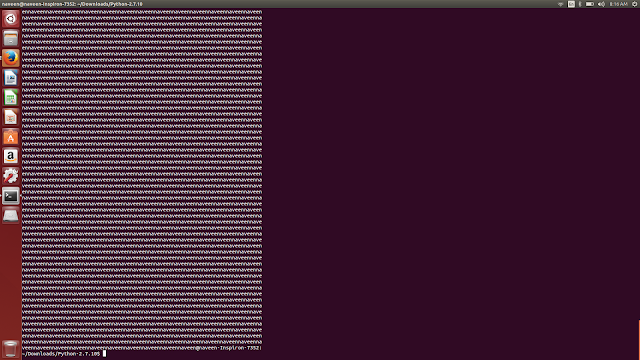
the make printing 'naveennaveen...' as expected,
but what i am not understading , is the make command do both compiling the C program and running the executables ? I am not clear how cevel.c is running while we do MAKE ?
make commnad - http://www.computerhope.com/unix/umake.htm http://linoxide.com/how-tos/linux-make-command-examples/
I have managed to download the Python source gz file from https://www.python.org/ftp/python/2.7.10/Python-2.7.10.tar.xz and edit the cevel.c internal program in python and I have added printf("naveen") in infinite for loop in the program.
and I did below steps steps-
1. ./configure
2. make

the make printing 'naveennaveen...' as expected,
but what i am not understading , is the make command do both compiling the C program and running the executables ? I am not clear how cevel.c is running while we do MAKE ?
make commnad - http://www.computerhope.com/unix/umake.htm http://linoxide.com/how-tos/linux-make-command-examples/