Tuesday, November 17, 2015


Monday, November 16, 2015
Saturday, November 14, 2015
Saturday, October 3, 2015
30 days with Ubuntu linux
If you really thinking out of windows Os, please go through this tutorial after installing ubuntu https://help.ubuntu.com/community/Installation/FromUSBStick
30 days with Ubuntu Linux - http://www.pcworld.com/article/229187/30_days_with_ubuntu_linux.html?page=2
Ubuntu internet wifi speed increase tip
Probably you can try the below steps in the Ubuntu machine to see whether your Internet speed is increasing or not
Step1:Put the below code in the bottom of the file using the bellow command
sudo vi /etc/sysctl.conf
net.core.rmem_default = 524288
net.core.rmem_max = 524288
net.core.wmem_default = 524288
net.core.wmem_max = 524288
net.ipv4.tcp_wmem = 4096 87380 524288
net.ipv4.tcp_rmem = 4096 87380 524288
net.ipv4.tcp_mem = 524288 524288 524288
net.ipv4.tcp_rfc1337 = 1
net.ipv4.ip_no_pmtu_disc = 0
net.ipv4.tcp_sack = 1
net.ipv4.tcp_fack = 1
net.ipv4.tcp_window_scaling = 1
net.ipv4.tcp_timestamps = 1
net.ipv4.tcp_ecn = 0
net.ipv4.route.flush = 1
Step2: run the below command
sudo sysctl -p
You can also disable your IPv6
Step1: go Wifi symbol and click it , you will get a edit connection option
Step2: select the wifi you are using and edit the configuration , in IPv6 configuration , select method as 'ingnore'
Step1:Put the below code in the bottom of the file using the bellow command
sudo vi /etc/sysctl.conf
net.core.rmem_default = 524288
net.core.rmem_max = 524288
net.core.wmem_default = 524288
net.core.wmem_max = 524288
net.ipv4.tcp_wmem = 4096 87380 524288
net.ipv4.tcp_rmem = 4096 87380 524288
net.ipv4.tcp_mem = 524288 524288 524288
net.ipv4.tcp_rfc1337 = 1
net.ipv4.ip_no_pmtu_disc = 0
net.ipv4.tcp_sack = 1
net.ipv4.tcp_fack = 1
net.ipv4.tcp_window_scaling = 1
net.ipv4.tcp_timestamps = 1
net.ipv4.tcp_ecn = 0
net.ipv4.route.flush = 1
Step2: run the below command
sudo sysctl -p
You can also disable your IPv6
Step1: go Wifi symbol and click it , you will get a edit connection option
Step2: select the wifi you are using and edit the configuration , in IPv6 configuration , select method as 'ingnore'
Sunday, September 27, 2015
how to write multiple files c programs and make/compile it together
Honestly this is the first time I am trying to write multiple file C program and trying to compile it together.
Details are explained in the below video
Details are explained in the below video
Building python
I have installed Ubuntu again in Dell laptop to experiment Cpython internals http://naveendavisv.blogspot.in/2015/08/cpython-internals-interpreter-and.html.
I have managed to download the Python source gz file from https://www.python.org/ftp/python/2.7.10/Python-2.7.10.tar.xz and edit the cevel.c internal program in python and I have added printf("naveen") in infinite for loop in the program.
and I did below steps steps-
1. ./configure
2. make
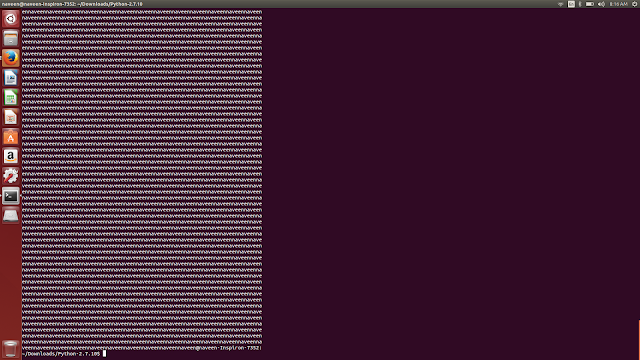
the make printing 'naveennaveen...' as expected,
but what i am not understading , is the make command do both compiling the C program and running the executables ? I am not clear how cevel.c is running while we do MAKE ?
make commnad - http://www.computerhope.com/unix/umake.htm http://linoxide.com/how-tos/linux-make-command-examples/
I have managed to download the Python source gz file from https://www.python.org/ftp/python/2.7.10/Python-2.7.10.tar.xz and edit the cevel.c internal program in python and I have added printf("naveen") in infinite for loop in the program.
and I did below steps steps-
1. ./configure
2. make

the make printing 'naveennaveen...' as expected,
but what i am not understading , is the make command do both compiling the C program and running the executables ? I am not clear how cevel.c is running while we do MAKE ?
make commnad - http://www.computerhope.com/unix/umake.htm http://linoxide.com/how-tos/linux-make-command-examples/
Saturday, August 29, 2015
Online Python Tutor
Online Python Programming Tutor
First time I am seeing the very nice online tutor for Python http://www.pythontutor.com/visualize.html#mode=display
After writing the code , when you click on the Forward button , the flow of the statement can be seen in the program listing , at the same time variables values are listing in the right side.. its interesting .. Try this below
First time I am seeing the very nice online tutor for Python http://www.pythontutor.com/visualize.html#mode=display
After writing the code , when you click on the Forward button , the flow of the statement can be seen in the program listing , at the same time variables values are listing in the right side.. its interesting .. Try this below
Sunday, August 23, 2015
Friday, August 21, 2015
Why you need to compile your C program in GCC
GCC Compiler:
10 reason why we need to move to GCC -
http://stackoverflow.com/questions/1313702/gcc-compiler-advantage
If you need to compile C program, always go for GCC. You can find GCC online documentation in the below link http://naveendavisv.blogspot.com/2008/09/gcc-online-documentation.html
GCC and cross compilation
What is cross compilation - https://en.wikipedia.org/wiki/Cross_compiler
how to use GCC as cross compiler - http://wiki.osdev.org/GCC_Cross-Compiler
How to use GCC to compile ARM code :
https://launchpad.net/gcc-arm-embedded
http://gcc.gnu.org/onlinedocs/gcc/ARM-Options.html
http://askubuntu.com/questions/487082/compiling-c-code-for-arm-processor-on-ubuntu-12-04
How to use GCC for PIC :
http://hackaday.com/2010/11/03/how-to-program-pics-using-linux/
10 reason why we need to move to GCC -
http://stackoverflow.com/questions/1313702/gcc-compiler-advantage
If you need to compile C program, always go for GCC. You can find GCC online documentation in the below link http://naveendavisv.blogspot.com/2008/09/gcc-online-documentation.html
GCC and cross compilation
What is cross compilation - https://en.wikipedia.org/wiki/Cross_compiler
how to use GCC as cross compiler - http://wiki.osdev.org/GCC_Cross-Compiler
How to use GCC to compile ARM code :
https://launchpad.net/gcc-arm-embedded
http://gcc.gnu.org/onlinedocs/gcc/ARM-Options.html
http://askubuntu.com/questions/487082/compiling-c-code-for-arm-processor-on-ubuntu-12-04
How to use GCC for PIC :
http://hackaday.com/2010/11/03/how-to-program-pics-using-linux/
Thursday, August 20, 2015
Why linux ?
Why Linux ?
More than an operating system, Linux is a nice learning platform which takes you through some challenges always..

And there is great community loves GNU
why Linux, reasons is explained nicely in this website http://www.whylinuxisbetter.net/
Linux commands - http://www.tutorialspoint.com/listtutorial/Linux-Shell-commands/2596
Linux Concepts - http://www.tutorialspoint.com/listtutorials/linux/basic-concepts/1
Get Ubuntu Linux here - http://www.ubuntu.com/download
More than an operating system, Linux is a nice learning platform which takes you through some challenges always..

And there is great community loves GNU
why Linux, reasons is explained nicely in this website http://www.whylinuxisbetter.net/
Linux commands - http://www.tutorialspoint.com/listtutorial/Linux-Shell-commands/2596
Linux Concepts - http://www.tutorialspoint.com/listtutorials/linux/basic-concepts/1
Get Ubuntu Linux here - http://www.ubuntu.com/download
Friday, August 14, 2015
Angular.js + Node.js+ Express.js
Experimenting Angular.js with Node
I was actually trying to install angular.js seed on Node.js that I found in the below link
http://briantford.com/blog/angular-express
Angularjs tutorial - http://www.w3schools.com/angular/
codeacademy angularjs - https://www.codeacademy.com/courses/learn-angularjs
succeeded to the run application - node app.js .. after copying the zip file to the folder .
I got some errors while running the app.js like most middleware like "errorhandler is not bundled to the express". I just commented out the error handler statements and ran the app.
http://localhost:3000/


I was actually trying to install angular.js seed on Node.js that I found in the below link
http://briantford.com/blog/angular-express
Angularjs tutorial - http://www.w3schools.com/angular/
codeacademy angularjs - https://www.codeacademy.com/courses/learn-angularjs
succeeded to the run application - node app.js .. after copying the zip file to the folder .
I got some errors while running the app.js like most middleware like "errorhandler is not bundled to the express". I just commented out the error handler statements and ran the app.
http://localhost:3000/


Wednesday, August 12, 2015
How to start with Texas lanuchpad
TEXAS LAUNCHPAD
Electrical,electronics and computer science engineering students should program something with launchpad before you pass out :-)
Theye are lot of tutorials available and it's very cheap. It's worth of spending money for it.
http://www.ti.com/ww/en/launchpad/launchpad.html?DCMP=rtos&HQS=ep-sdo-rtos-pr-lp-launchpad-en
http://hackaday.com/2010/08/11/how-to-launchpad-programming-with-linux/
Electrical,electronics and computer science engineering students should program something with launchpad before you pass out :-)
Theye are lot of tutorials available and it's very cheap. It's worth of spending money for it.
http://www.ti.com/ww/en/launchpad/launchpad.html?DCMP=rtos&HQS=ep-sdo-rtos-pr-lp-launchpad-en
http://hackaday.com/2010/08/11/how-to-launchpad-programming-with-linux/
Sunday, August 9, 2015
How to start web application with docker for free
Below is good article that we can flow to create and run a Web application using docker.
https://blog.codeship.com/running-mean-web-application-docker-containers-aws/
https://blog.codeship.com/running-mean-web-application-docker-containers-aws/
Friday, August 7, 2015
How to use Docker ?
First of all , what is docker ?... I came across docker when I was searching for code editor and how to compile C code form web applications.
http://qnimate.com/create-an-frontend-editor-with-code-highlighting-and-execution/
Docker - https://www.docker.com/
Docker is an open-source project that automates the deployment of applications inside software containers, by providing an additional layer of abstraction and automation of operating-system-level virtualization on Linux. https://en.wikipedia.org/wiki/Docker_(software)
I actually want to run the code in a virtual machine ( for this idea http://naveendavisv.blogspot.com/2015/08/thinking-to-build-microcontroller.html) and show the output in a text area, even though I don't need the full output, but if the code can be checked for syntax error, I am much happy...
http://qnimate.com/create-an-frontend-editor-with-code-highlighting-and-execution/
Docker - https://www.docker.com/
Docker is an open-source project that automates the deployment of applications inside software containers, by providing an additional layer of abstraction and automation of operating-system-level virtualization on Linux. https://en.wikipedia.org/wiki/Docker_(software)
I actually want to run the code in a virtual machine ( for this idea http://naveendavisv.blogspot.com/2015/08/thinking-to-build-microcontroller.html) and show the output in a text area, even though I don't need the full output, but if the code can be checked for syntax error, I am much happy...
Thursday, August 6, 2015
Electrical student must read websites
Electrical student must read websites
http://www.electricalengineeringschools.org/engineer-resources/
http://www.electricalengineeringschools.org/engineer-resources/