Monday, June 23, 2014


Monday, April 28, 2014
Tuesday, September 3, 2013
Sunday, February 24, 2013
Android Fast Application building tools
There are some tools available free to build Android application easily.
http://beta.appinventor.mit.edu - This is very interesting site developed my MIT. You can learn new way of programming.
http://www.appsgeyser.com - Tool to build apps easily
http://beta.appinventor.mit.edu - This is very interesting site developed my MIT. You can learn new way of programming.
http://www.appsgeyser.com - Tool to build apps easily
Thursday, September 6, 2012
Subsystem Details:
Creating a Subsystem
Description
You can create a subsystem description
in two ways. You can copy an existing
subsystem description and change it, or
you can create an entirely new description.
The following are two approaches you
can use:
v Copying an existing
subsystem description
1. Create a duplicate object,
CRTDUPOBJ, of an existing subsystem
description. (You can also use the
WRKOBJ or WRKOBJPDM commands.)
2. Change the copy of the subsystem
description.
See Appendix C. IBM-Supplied Object
Contents, for examples.
v Creating an entirely
new subsystem description
1. Create a subsystem description
(CRTSBSD).
2. Create a job description (CRTJOBD).
3. Add work entries to the subsystem
description.
a. ADDWSE (Add workstation entry)
b. ADDJOBQE (Add job queue entry)
c. ADDCMNE (Add communications entry)
d. ADDAJE (Add autostart job entry)
e. ADDPJE (Add prestart job entry)
4. Create a class (CRTCLS).
5. Add routing entries to the
subsystem description (ADDRTGE).
Starting a Subsystem
To start a subsystem, use the Start
Subsystem (STRSBS) command or the Work
with Subsystem Description (WRKSBSD)
command. To use the STRSBS
command, specify the following:
STRSBS SBSD
(SBSD=library/subsystem
description name)
For example
STRSBS
MYLIB/MYSTORE
How a Subsystem
Starts
When a subsystem starts, the system
allocates several items and starts autostart
and prestart jobs before it is ready
for work.
1. After the Start Subsystem (STRSBS)
command is issued, the system allocates
the following items, finding the
information in the subsystem description:
v Pools of main storage
v Display stations
v Communications
devices
v Job queues
2. Next, the autostart jobs and
prestart jobs are started and the subsystem is
ready for work. Figure 3 shows what
occurs when a subsystem starts.
Chapter 4. Subsystems 83
Subsystem Monitor Job
The subsystem monitor job provides
control over an active subsystem. It provides
functions such as initiating,
controlling, and ending jobs. Several subsystem monitor
jobs may run on a system at any given
time.
Subsystem monitor jobs are identified
by type SBS on the Work with Active Jobs
display. You can see this by using the
Work with Active Jobs (WRKACTJOB)
command.
Note: IBM supplies two
complete controlling subsystem configurations: QBASE
(the default controlling subsystem),
and QCTL. Only one controlling
subsystem can be active on the system
at one time. The Controlling
Subsystem Description (QCTLSBSD) system value determines


Saturday, July 21, 2012
Electronics Hobbyist
Follow some interesting embedded system projects in the below hobbyist link.
some electronics related blogs where we can learn more ..
Wednesday, November 9, 2011
Android Fundamentals
Before directly going to the application development, I thought its better to read something on the Android OS. It was quite interesting to me when I understand that each applications in this OS is treated as different user with different permissions to the assoicated files.More over this OS runs with Linux Kernal as a multi-user Linux system in which each application is a different user.
•By default, the system assigns each application a unique Linux user ID (the ID is used only by the system and is unknown to the application). The system sets permissions for all the files in an application so that only the user ID assigned to that application can access them.
•Each process has its own virtual machine (VM), so an application's code runs in isolation from other applications.
•By default, every application runs in its own Linux process. Android starts the process when any of the application's components need to be executed, then shuts down the process when it's no longer needed or when the system must recover memory for other applications
•It's possible to arrange for two applications to share the same Linux user ID, in which case they are able to access each other's files. To conserve system resources, applications with the same user ID can also arrange to run in the same Linux process and share the same VM (the applications must also be signed with the same certificate).
•An application can request permission to access device data such as the user's contacts, SMS messages, the mountable storage (SD card), camera, Bluetooth, and more. All application permissions must be granted by the user at install time.
Refer Application Fundamentals
•By default, the system assigns each application a unique Linux user ID (the ID is used only by the system and is unknown to the application). The system sets permissions for all the files in an application so that only the user ID assigned to that application can access them.
•Each process has its own virtual machine (VM), so an application's code runs in isolation from other applications.
•By default, every application runs in its own Linux process. Android starts the process when any of the application's components need to be executed, then shuts down the process when it's no longer needed or when the system must recover memory for other applications
•It's possible to arrange for two applications to share the same Linux user ID, in which case they are able to access each other's files. To conserve system resources, applications with the same user ID can also arrange to run in the same Linux process and share the same VM (the applications must also be signed with the same certificate).
•An application can request permission to access device data such as the user's contacts, SMS messages, the mountable storage (SD card), camera, Bluetooth, and more. All application permissions must be granted by the user at install time.
Refer Application Fundamentals
Saturday, November 5, 2011
Android Applications Development

Next years smart phones will be driven be Android OS.Android is a software stack for mobile devices that includes an operating system, middleware, and key applications. The Android SDK provides the tools and libraries necessary to begin developing applications that run on Android-powered devices.
I started with the Android application development.For the the initial set up ,going through the Youtube Tutorials. The Android application development tools are Eclipse and Android sdk. Some of the links recently I tried to follow.
http://code.google.com/android/
You can download the Android sdk from the following link http://developer.android.com/sdk/index.html
http://developer.android.com/index.html
and also the youtube videos from http://www.thenewboston.com/
Saturday, August 13, 2011
AS400 SQL STORED PROCEDURES AND EXTERNAL STORED PROCEDURES EXAMPLES
A stored procedure is a subroutine available to applications accessing a relational database system. Stored procedures are actually stored in the database data dictionary. In AS400 it is stored in SYSROUTINES and SYSPARMS tables.
AS400 the stored procedures cane called from SQLRPGLE program or from STRSQL utility screen. Stored procedures may return result sets i.e. the results of a SELECT statement,or it can retun the paramters declared as OUT. Result sets can be processed using cursors, by other stored procedures, by associating a result set locator, or by applications. Stored procedures may also contain declared variables for processing data and cursors that allow it to loop through multiple rows in a table. Stored procedure languages typically include IF, WHILE, LOOP, REPEAT, and CASE statements, and more. Stored procedures can receive variables, return results or modify variables and return them, depending on how and where the variable is declared
There are two type of stored procedures in AS400 - External stored procedures and SQL stored procedures. While creating the external Procedures an external program( CL,RPGLE,COBOL,C etc) will linked to procedure. But in SQL stored procedures all the statements will be SQL statements. The AS400 stored procedures can also be called from .NET,JAVA,VB etc other front end applications.
External Stored Procedure
In the below example an external procedure is created with CREATE PROCEDURE statement in the STRSQL utility. The program CHECKCUST( RPGLE - for checking the customer is present or not ) is linked to the procedure so that when a call comes to the procedure, indirectly procedure invokes the program with passed parameters. Below program (CHECKCUST) returns a flag(RECFND) which procedure passes to the calling program PROTESTPGM (SQLRPGLE).
SOURCE : Procedure calling program (PROTESTPGM)
-----------------------------------------------
The real cases the procedures are called from the front-end applications. But we can also call the procedures from SQLRPGLE in AS400 itself.

SOURCE: CHECKCUST ( RPGLE Program attached to Procedure)
-------------------------------------------------------

CREATE PROCEDURE :
The below SQL statment includes the language of the external program,External program Name/Library. For more Stored Procedures
CREATE PROCEDURE DAVNAV1/PROCCHECKCUST(IN CUSTNUM DECIMAL (5,0), OUT
RECFOUND CHAR (1 )) LANGUAGE RPGLE DETERMINISTIC NO SQL EXTERNAL
NAME DAVNAV1/CHECKCUST PARAMETER STYLE GENERAL
Procedure PROCCHECKCUST was created in DAVNAV1.
For verifing:
SELECT * FROM SYSROUTINES or SELECT * FROM SYSPARAMS , execute the SQL and see the SCHEMA entry in the tables.
SQL Stored Procedures
SQL stored procedures are written in SQL language and this can be compiled or created using CREATE PROCEDURE or RUNSQLSTM command or iSeries Navigator
SQL SOURCE(DELETCUST):
Below example SQL source is for creating a procedure to delete the specific Customer Record.
http://publib.boulder.ibm.com/html/as400/v4r5/ic2931/info/db2/rbafymst151.htm#HDRSQLPROC

Compilation: The sql source can be compiled using the Command RUNSQLSTM
RUNSQLSTM SRCFILE(DAVNAV1/QSQLSRC) SRCMBR(DELETCUST) COMMIT(*NC) DBGVIEW(*SOURCE)
COMMIT(*NC) --> Specifies that commitment control is not used. Uncommitted changes in other jobs can be seen. If the SQL DROP SCHEMA
statement is included in the program, *NONE or *NC must be used.
DBGVIEW(*SOURCE) --> debugging with source.
CALLING SQLRPGLE PROGRAM:
--------------------------------------

AS400 the stored procedures cane called from SQLRPGLE program or from STRSQL utility screen. Stored procedures may return result sets i.e. the results of a SELECT statement,or it can retun the paramters declared as OUT. Result sets can be processed using cursors, by other stored procedures, by associating a result set locator, or by applications. Stored procedures may also contain declared variables for processing data and cursors that allow it to loop through multiple rows in a table. Stored procedure languages typically include IF, WHILE, LOOP, REPEAT, and CASE statements, and more. Stored procedures can receive variables, return results or modify variables and return them, depending on how and where the variable is declared
There are two type of stored procedures in AS400 - External stored procedures and SQL stored procedures. While creating the external Procedures an external program( CL,RPGLE,COBOL,C etc) will linked to procedure. But in SQL stored procedures all the statements will be SQL statements. The AS400 stored procedures can also be called from .NET,JAVA,VB etc other front end applications.
External Stored Procedure
In the below example an external procedure is created with CREATE PROCEDURE statement in the STRSQL utility. The program CHECKCUST( RPGLE - for checking the customer is present or not ) is linked to the procedure so that when a call comes to the procedure, indirectly procedure invokes the program with passed parameters. Below program (CHECKCUST) returns a flag(RECFND) which procedure passes to the calling program PROTESTPGM (SQLRPGLE).
SOURCE : Procedure calling program (PROTESTPGM)
-----------------------------------------------
The real cases the procedures are called from the front-end applications. But we can also call the procedures from SQLRPGLE in AS400 itself.

SOURCE: CHECKCUST ( RPGLE Program attached to Procedure)
-------------------------------------------------------

CREATE PROCEDURE :
The below SQL statment includes the language of the external program,External program Name/Library. For more Stored Procedures
CREATE PROCEDURE DAVNAV1/PROCCHECKCUST(IN CUSTNUM DECIMAL (5,0), OUT
RECFOUND CHAR (1 )) LANGUAGE RPGLE DETERMINISTIC NO SQL EXTERNAL
NAME DAVNAV1/CHECKCUST PARAMETER STYLE GENERAL
Procedure PROCCHECKCUST was created in DAVNAV1.
For verifing:
SELECT * FROM SYSROUTINES or SELECT * FROM SYSPARAMS , execute the SQL and see the SCHEMA entry in the tables.
SQL Stored Procedures
SQL stored procedures are written in SQL language and this can be compiled or created using CREATE PROCEDURE or RUNSQLSTM command or iSeries Navigator
SQL SOURCE(DELETCUST):
Below example SQL source is for creating a procedure to delete the specific Customer Record.
http://publib.boulder.ibm.com/html/as400/v4r5/ic2931/info/db2/rbafymst151.htm#HDRSQLPROC

Compilation: The sql source can be compiled using the Command RUNSQLSTM
RUNSQLSTM SRCFILE(DAVNAV1/QSQLSRC) SRCMBR(DELETCUST) COMMIT(*NC) DBGVIEW(*SOURCE)
COMMIT(*NC) --> Specifies that commitment control is not used. Uncommitted changes in other jobs can be seen. If the SQL DROP SCHEMA
statement is included in the program, *NONE or *NC must be used.
DBGVIEW(*SOURCE) --> debugging with source.
CALLING SQLRPGLE PROGRAM:
--------------------------------------

Friday, July 29, 2011
HAVE A SEARCH FOR BLOG TEMPLATE
When I searched for different blog templates , I have got below site which provides some amazing blog templates ... going through this and doing some modifications .. Blogger Tricks
Thursday, July 28, 2011
Blog Template Changed
Its quite easy to change the Template of the blog in Blogger. Just we need to select the template decided from the menu's and apply it.... There are option to edit the background attributes as well as Layouts .


Tuesday, June 28, 2011
WebSim( MIT open course Electronics Lab)
This is very interesting to do the basic electronics lab through the MIT open Electronics Lab (Web Sim) , also can listen excellent lectures from MIT professor on Basic Electronics
Wednesday, March 2, 2011
RAM8
RAM8:is a memory unit of 8 registers joined together to store 16*8 bits (16 byte). Based on the address (3bits) ,the Dmux8way device control the load signal for each Registers.
CHIP RAM8 {
IN in[16], load, address[3];
OUT out[16];
PARTS:
// load given as input of 8 way Demultipelxer so that 'load' is seperated to control each Registers
DMux8Way(in=load, sel=address, a=a, b=b, c=c, d=d, e=e, f=f, g=g, h=h);
/* 16-Bit register, load is given as each seperated lines
* If load[t-1]=1 then out[t] = in[t-1]
*/
Register(in=in, load=a, out=aa);
Register(in=in, load=b, out=bb);
Register(in=in, load=c, out=cc);
Register(in=in, load=d, out=dd);
Register(in=in, load=e, out=ee);
Register(in=in, load=f, out=ff);
Register(in=in, load=g, out=gg);
Register(in=in, load=h, out=hh);
// 16bit outputs from each Registers connected through 16bit 8 way multiplexer in order to get the outputs based on the Address
Mux8Way16(a=aa, b=bb, c=cc, d=dd, e=ee, f=ff, g=gg, h=hh, sel=address, out=out);
}
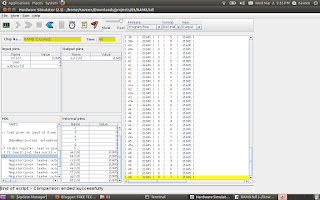
CHIP RAM8 {
IN in[16], load, address[3];
OUT out[16];
PARTS:
// load given as input of 8 way Demultipelxer so that 'load' is seperated to control each Registers
DMux8Way(in=load, sel=address, a=a, b=b, c=c, d=d, e=e, f=f, g=g, h=h);
/* 16-Bit register, load is given as each seperated lines
* If load[t-1]=1 then out[t] = in[t-1]
*/
Register(in=in, load=a, out=aa);
Register(in=in, load=b, out=bb);
Register(in=in, load=c, out=cc);
Register(in=in, load=d, out=dd);
Register(in=in, load=e, out=ee);
Register(in=in, load=f, out=ff);
Register(in=in, load=g, out=gg);
Register(in=in, load=h, out=hh);
// 16bit outputs from each Registers connected through 16bit 8 way multiplexer in order to get the outputs based on the Address
Mux8Way16(a=aa, b=bb, c=cc, d=dd, e=ee, f=ff, g=gg, h=hh, sel=address, out=out);
}

Tuesday, February 8, 2011
How to build a Memory for a computing System
BIT STORE
The elementary functionality of a Computing System is that it should store data somewhere and should be collected it back whenever require. We can call this block as Memory unit of a computer. The Memory can be build using the sequential chip called flip-flop. Below HDL can store a bit . The small memory can Write and Read using the 'load' signal.
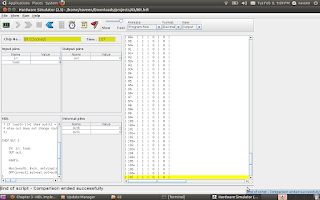
CHIP Bit {
IN in, load;
OUT out;
PARTS:
Mux(a=outb, b=in, sel=load,out=out1); //Mux input taken as the feedback of D-Flip Flop out
DFF(in=out1,out=out,out=outb);
}
================================================================================
Register
If a Bus(16bit) connected to 16 parallel a Bit chip ,then we can store 16bit at a time. This is known as Register.
CHIP Register {
IN in[16], load;
OUT out[16];
PARTS:
Bit(in=in[0],load=load,out=out[0]);
Bit(in=in[1],load=load,out=out[1]);
Bit(in=in[2],load=load,out=out[2]);
Bit(in=in[3],load=load,out=out[3]);
Bit(in=in[4],load=load,out=out[4]);
Bit(in=in[5],load=load,out=out[5]);
Bit(in=in[6],load=load,out=out[6]);
Bit(in=in[7],load=load,out=out[7]);
Bit(in=in[8],load=load,out=out[8]);
Bit(in=in[9],load=load,out=out[9]);
Bit(in=in[10],load=load,out=out[10]);
Bit(in=in[11],load=load,out=out[11]);
Bit(in=in[12],load=load,out=out[12]);
Bit(in=in[13],load=load,out=out[13]);
Bit(in=in[14],load=load,out=out[14]);
Bit(in=in[15],load=load,out=out[15]);
}
The elementary functionality of a Computing System is that it should store data somewhere and should be collected it back whenever require. We can call this block as Memory unit of a computer. The Memory can be build using the sequential chip called flip-flop. Below HDL can store a bit . The small memory can Write and Read using the 'load' signal.
CHIP Bit {
IN in, load;
OUT out;
PARTS:
Mux(a=outb, b=in, sel=load,out=out1); //Mux input taken as the feedback of D-Flip Flop out
DFF(in=out1,out=out,out=outb);
}
================================================================================
Register
If a Bus(16bit) connected to 16 parallel a Bit chip ,then we can store 16bit at a time. This is known as Register.
CHIP Register {
IN in[16], load;
OUT out[16];
PARTS:
Bit(in=in[0],load=load,out=out[0]);
Bit(in=in[1],load=load,out=out[1]);
Bit(in=in[2],load=load,out=out[2]);
Bit(in=in[3],load=load,out=out[3]);
Bit(in=in[4],load=load,out=out[4]);
Bit(in=in[5],load=load,out=out[5]);
Bit(in=in[6],load=load,out=out[6]);
Bit(in=in[7],load=load,out=out[7]);
Bit(in=in[8],load=load,out=out[8]);
Bit(in=in[9],load=load,out=out[9]);
Bit(in=in[10],load=load,out=out[10]);
Bit(in=in[11],load=load,out=out[11]);
Bit(in=in[12],load=load,out=out[12]);
Bit(in=in[13],load=load,out=out[13]);
Bit(in=in[14],load=load,out=out[14]);
Bit(in=in[15],load=load,out=out[15]);
}
Thursday, February 3, 2011
ALU CHIP
ALU (Arithmetic and Logic Unit):
The basic building block for a computer is ALU which can perform the basic Arithmetic and logical operations. The Chip creation using the HDL from the basic gates(AND,NOT,MUX,ADDER..etc) gives you the in site knowledge and interest for binary number operations. The below HDL ALU chip can perform 18 operations, potentially which can compute 64.
Follow the course The Elements of Computing Systems


CHIP ALU {
IN // 16-bit inputs:
x[16], y[16],
// Control bits:
zx, // Zero the x input
nx, // Negate the x input
zy, // Zero the y input
ny, // Negate the y input
f, // Function code: 1 for add, 0 for and
no; // Negate the out output
OUT // 16-bit output
out[16],
// ALU output flags
zr, // 1 if out=0, 0 otherwise
ng; // 1 if out<0, 0 otherwise
PARTS:
Mux16(a[0..15]=x[0..15], b[0..15]=false, sel=zx, out[0..15]=x1);
Mux16(a[0..15]=y[0..15], b[0..15]=false, sel=zy, out[0..15]=y1);
Not16(in[0..15]=x1, out[0..15]=notx1);
Not16(in[0..15]=y1, out[0..15]=noty1);
Mux16(a[0..15]=x1, b[0..15]=notx1, sel=nx, out[0..15]=x2);
Mux16(a[0..15]=y1, b[0..15]=noty1, sel=ny, out=y2);
And16(a[0..15]=x2, b[0..15]=y2, out=Andxy);
Add16(a[0..15]=x2, b[0..15]=y2, out=Addxy);
Mux16(a[0..15]=Andxy, b[0..15]=Addxy, sel=f, out=x3);
Not16(in[0..15]=x3, out=notx3);
Mux16(a[0..15]=x3, b[0..15]=notx3, sel=no, out[0]=ou1,out[1]=ou2,out[2]=ou3,out[3]=ou4,out[4]=ou5,out[5]=ou6,out[6]=ou7,out[7]=ou8,out[8]=ou9,out[9]=ou10,out[10]=ou11,out[11]=ou12,out[12]=ou13,out[13]=ou14,out[14]=ou15,out[15]=ou16);
Or(a=ou1, b=ou2,out= out1);
Or(a=ou2,b= out1,out= out2);
Or(a=ou3,b= out2,out= out3);
Or(a=ou4,b= out3,out= out4);
Or(a=ou5,b= out4,out= out5);
Or(a=ou6,b= out5,out= out6);
Or(a=ou7,b= out6,out= out7);
Or(a=ou8,b= out7,out= out8);
Or(a=ou9,b= out8,out= out9);
Or(a=ou10,b= out9,out= out10);
Or(a=ou11,b= out10,out= out11);
Or(a=ou12,b= out11,out= out12);
Or(a=ou13,b= out12,out= out13);
Or(a=ou14,b= out13,out= out14);
Or(a=ou15,b= out14,out= out15);
Or(a=ou16,b= out15,out= notzr);
Not(in=notzr,out=zr);
And(a=ou16,b=true,out=ng);
And(a=ou1,b=true,out=out[0]);
And(a=ou2,b=true,out=out[1]);
And(a=ou3,b=true,out=out[2]);
And(a=ou4,b=true,out=out[3]);
And(a=ou5,b=true,out=out[4]);
And(a=ou6,b=true,out=out[5]);
And(a=ou7,b=true,out=out[6]);
And(a=ou8,b=true,out=out[7]);
And(a=ou9,b=true,out=out[8]);
And(a=ou10,b=true,out=out[9]);
And(a=ou11,b=true,out=out[10]);
And(a=ou12,b=true,out=out[11]);
And(a=ou13,b=true,out=out[12]);
And(a=ou14,b=true,out=out[13]);
And(a=ou15,b=true,out=out[14]);
And(a=ou16,b=true,out=out[15]);
}
Monday, January 24, 2011
Half Adder & Full Adder
Half adder
CHIP HalfAdder {
IN a, b;
OUT sum, // LSB of a + b
carry; // MSB of a + b
PARTS:
Xor(a=a, b=b, out=sum);
And(a=a, b=b, out=carry);
}
Full Adder
CHIP FullAdder {
IN a, b, c;
OUT sum, // LSB of a + b + c
carry; // MSB of a + b + c
PARTS:
HalfAdder(a=c, b=b, sum=sum1, carry=carry1);
HalfAdder(a=a, b=sum1, sum=sum);
And(a=a, b=sum1, out=out1);
Or(a=carry1, b=out1, out=carry);
}
Adder 16 bit
CHIP Add16 {
IN a[16], b[16];
OUT out[16];
PARTS:
HalfAdder(a= a[0], b=b[0], sum= out[0], carry=carry1);
FullAdder(a= a[1], b=b[1], c =carry1, sum = out[1], carry = carry2);
FullAdder(a= a[2], b=b[2], c =carry2, sum = out[2], carry = carry3);
FullAdder(a= a[3], b=b[3], c =carry3, sum = out[3], carry = carry4);
FullAdder(a= a[4], b=b[4], c =carry4, sum = out[4], carry = carry5);
FullAdder(a= a[5], b=b[5], c =carry5, sum = out[5], carry = carry6);
FullAdder(a= a[6], b=b[6], c =carry6, sum = out[6], carry = carry7);
FullAdder(a= a[7], b=b[7], c =carry7, sum = out[7], carry = carry8);
FullAdder(a= a[8], b=b[8], c =carry8, sum = out[8], carry = carry9);
FullAdder(a= a[9], b=b[9], c =carry9, sum = out[9], carry = carry10);
FullAdder(a= a[10], b=b[10], c =carry10, sum = out[10], carry = carry11);
FullAdder(a= a[11], b=b[11], c =carry11, sum = out[11], carry = carry12);
FullAdder(a= a[12], b=b[12], c =carry12, sum = out[12], carry = carry13);
FullAdder(a= a[13], b=b[13], c =carry13, sum = out[13], carry = carry14);
FullAdder(a= a[14], b=b[14], c =carry14, sum = out[14], carry = carry15);
FullAdder(a= a[15], b=b[15], c =carry15, sum = out[15], carry = carry16);
}
Increment 16bit
CHIP Inc16 {
IN in[16];
OUT out[16];
PARTS:
Add16(a[0..15] = in[0..15], b[1..15] = false, b[0] = true, out = out);
}
CHIP HalfAdder {
IN a, b;
OUT sum, // LSB of a + b
carry; // MSB of a + b
PARTS:
Xor(a=a, b=b, out=sum);
And(a=a, b=b, out=carry);
}
Full Adder
CHIP FullAdder {
IN a, b, c;
OUT sum, // LSB of a + b + c
carry; // MSB of a + b + c
PARTS:
HalfAdder(a=c, b=b, sum=sum1, carry=carry1);
HalfAdder(a=a, b=sum1, sum=sum);
And(a=a, b=sum1, out=out1);
Or(a=carry1, b=out1, out=carry);
}
Adder 16 bit
CHIP Add16 {
IN a[16], b[16];
OUT out[16];
PARTS:
HalfAdder(a= a[0], b=b[0], sum= out[0], carry=carry1);
FullAdder(a= a[1], b=b[1], c =carry1, sum = out[1], carry = carry2);
FullAdder(a= a[2], b=b[2], c =carry2, sum = out[2], carry = carry3);
FullAdder(a= a[3], b=b[3], c =carry3, sum = out[3], carry = carry4);
FullAdder(a= a[4], b=b[4], c =carry4, sum = out[4], carry = carry5);
FullAdder(a= a[5], b=b[5], c =carry5, sum = out[5], carry = carry6);
FullAdder(a= a[6], b=b[6], c =carry6, sum = out[6], carry = carry7);
FullAdder(a= a[7], b=b[7], c =carry7, sum = out[7], carry = carry8);
FullAdder(a= a[8], b=b[8], c =carry8, sum = out[8], carry = carry9);
FullAdder(a= a[9], b=b[9], c =carry9, sum = out[9], carry = carry10);
FullAdder(a= a[10], b=b[10], c =carry10, sum = out[10], carry = carry11);
FullAdder(a= a[11], b=b[11], c =carry11, sum = out[11], carry = carry12);
FullAdder(a= a[12], b=b[12], c =carry12, sum = out[12], carry = carry13);
FullAdder(a= a[13], b=b[13], c =carry13, sum = out[13], carry = carry14);
FullAdder(a= a[14], b=b[14], c =carry14, sum = out[14], carry = carry15);
FullAdder(a= a[15], b=b[15], c =carry15, sum = out[15], carry = carry16);
}
Increment 16bit
CHIP Inc16 {
IN in[16];
OUT out[16];
PARTS:
Add16(a[0..15] = in[0..15], b[1..15] = false, b[0] = true, out = out);
}
Saturday, January 22, 2011
Tuesday, January 18, 2011
CHAPTER 1
Chip Design is as interesting as Programming. For building OR gate from NAND,we need to remember the basic theorems in Digital electronics.De_Morgan laws
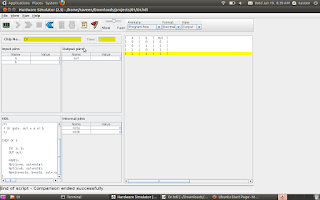
DMUX
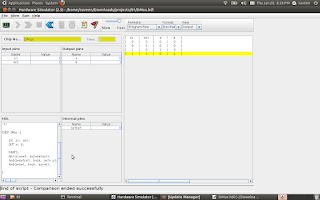
MUX
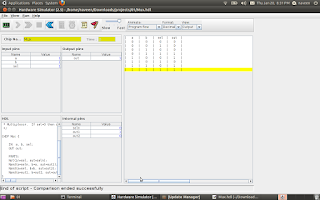
DMux4Way
CHIP DMux4Way {
IN in, sel[2];
OUT a, b, c, d;
PARTS:
DMux(in=in, sel=sel[1], a=mux1, b=mux2);
DMux(in=mux1, sel=sel[0], a=a, b=b);
DMux(in=mux2, sel=sel[0], a=c, b=d);
}
DMux8Way
CHIP DMux8Way {
IN in, sel[3];
OUT a, b, c, d, e, f, g, h;
PARTS:
DMux(in=in, sel=sel[2], a=mux1, b=mux2);
DMux4Way(in=mux1, sel[0]=sel[0], sel[1]=sel[1], a=a,b=b,c=c,d=d);
DMux4Way(in=mux2, sel[0]=sel[0], sel[1]=sel[1], a=e,b=f,c=g,d=h);
}

DMUX

MUX

DMux4Way
CHIP DMux4Way {
IN in, sel[2];
OUT a, b, c, d;
PARTS:
DMux(in=in, sel=sel[1], a=mux1, b=mux2);
DMux(in=mux1, sel=sel[0], a=a, b=b);
DMux(in=mux2, sel=sel[0], a=c, b=d);
}
DMux8Way
CHIP DMux8Way {
IN in, sel[3];
OUT a, b, c, d, e, f, g, h;
PARTS:
DMux(in=in, sel=sel[2], a=mux1, b=mux2);
DMux4Way(in=mux1, sel[0]=sel[0], sel[1]=sel[1], a=a,b=b,c=c,d=d);
DMux4Way(in=mux2, sel[0]=sel[0], sel[1]=sel[1], a=e,b=f,c=g,d=h);
}

Monday, January 17, 2011
Building all the chips
First chip AND built from NAND gate. The first chapter project is to build all the chips from NAND gate.One who finish the first chapter should build all the chips from NAND and test it.
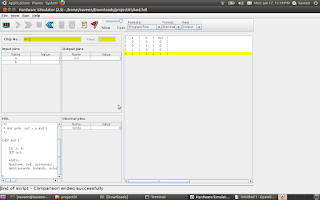
reference link http://www1.idc.ac.il/tecs/plan.html

reference link http://www1.idc.ac.il/tecs/plan.html
Sunday, January 9, 2011
Ubuntu 10.10
started running Ubuntu 10.10 in my laptop and installation is even easier than my last version 8.4.
You have everything in it when you compare it with Windows,or you can install with just 'Clicks'.
My Ubuntu running with Skype,facebook chat,Firefox,Totem Movie Player and Synaptic Package Manager (easiest installation software from network ) .
Get the free Ubuntu CD from here
You have everything in it when you compare it with Windows,or you can install with just 'Clicks'.
My Ubuntu running with Skype,facebook chat,Firefox,Totem Movie Player and Synaptic Package Manager (easiest installation software from network ) .
Get the free Ubuntu CD from here
Saturday, January 8, 2011
going to implement CPU and OS from single book ( 152 Rs)
I have ordered the book introductory CS course called The Elements of Computing Systems. . Hoping I can revist the ALU,CPU, .........assembler/vm/language/os .
Course simplifies Computer Science into a single course ( no need to study Computer Architecure , Assembly, language, complier, OS text books seperately ) ...one shot everthing in it . Don't know much about it ,but ordered the book. read below .TECS - The most amazing CS course I have seen!
Course simplifies Computer Science into a single course ( no need to study Computer Architecure , Assembly, language, complier, OS text books seperately ) ...one shot everthing in it . Don't know much about it ,but ordered the book. read below .TECS - The most amazing CS course I have seen!
Wednesday, December 1, 2010
Tuesday, November 30, 2010
set up WIFI in Ubuntu ( Wireless World)
Happy to share you that I managed to set up WIFI in my laptop. steps followed below
1.) disable atheros hardware access layer (System > Administration > Hardware Drivers)
2.) sudo reboot
3.) wget http://snapshots.madwifi.org/madwifi-hal-0.10.5.6/madwifi-hal-0.10.5.6-r3861-20080903.tar.gz
if you are not getting this link try with below command:
sudo svn co https://svn.madwifi-project.org/madwifi/trunk
4.) tar -xvf madwifi-hal-0.10.5.6-r3861-20080903.tar.gz
5.) cd madwifi-hal-0.10.5.6-r3861-20080903
6.) sudo make install
7.) sudo modprobe ath_pci
8.) sudo nano /etc/modules and append ‘ath_pci’
9.) sudo reboot
Happy WIFI surfing
reference:
http://www.ubuntugeek.com/atheros-ar5007-wireless-with-madwifi-on-ubuntu-804-hardy-heron.html
http://www.pcmech.com/article/how-to-quick-wireless-setup-with-ubuntu-804/
1.) disable atheros hardware access layer (System > Administration > Hardware Drivers)
2.) sudo reboot
3.) wget http://snapshots.madwifi.org/madwifi-hal-0.10.5.6/madwifi-hal-0.10.5.6-r3861-20080903.tar.gz
if you are not getting this link try with below command:
sudo svn co https://svn.madwifi-project.org/madwifi/trunk
4.) tar -xvf madwifi-hal-0.10.5.6-r3861-20080903.tar.gz
5.) cd madwifi-hal-0.10.5.6-r3861-20080903
6.) sudo make install
7.) sudo modprobe ath_pci
8.) sudo nano /etc/modules and append ‘ath_pci’
9.) sudo reboot
Happy WIFI surfing
reference:
http://www.ubuntugeek.com/atheros-ar5007-wireless-with-madwifi-on-ubuntu-804-hardy-heron.html
http://www.pcmech.com/article/how-to-quick-wireless-setup-with-ubuntu-804/
Wednesday, November 24, 2010
Subfile programs and Docs
1. docoments for Subfiles
subfile doc basics and simple programs
2. Subfile Keywords:
Subfile Keywords
3. Subfile Programs
Subfile Programs
4. subfiles detailed document
subfile
subfile doc basics and simple programs
2. Subfile Keywords:
Subfile Keywords
3. Subfile Programs
Subfile Programs
4. subfiles detailed document
subfile
Wednesday, June 2, 2010
Saturday, May 8, 2010
searching for as400 scope
Today I was just searching through the AS400 best sites .Then I got a blogspot which explains different perspective of OS400 ..
http://as400blog.blogspot.com/search/label/history
http://as400blog.blogspot.com/search/label/history
Wednesday, March 3, 2010
Procedures within an ILE RPG program
procedure within RPGLE program,
Something more am trying to know about procedure,subprocedure,service program. While googling sample programs and I created one procedure in program. Iam not sure about the the other concepts now. Let me hack it later.
these procedures can be used like built-in functions:-)
http://publib.boulder.ibm.com/iseries/v5r2/ic2924/books/c092508410.htm
steps for creation:
(1)
A Prototype which specifies the name, return value if any, and parameters if any.
(2)
A Begin-Procedure specification (B in position 24 of a procedure specification)
(3)
A Procedure-Interface definition, which specifies the return value and parameters, if any. The procedure interface must match the corresponding prototype. The procedure-interface definition is optional if the subprocedure does not return a value and does not have any parameters that are passed to it.
(4)
Other definition specifications of variables, constants and prototypes needed by the subprocedure. These definitions are local definitions.
(5)
Any calculation specifications, standard or free-form, needed to perform the task of the procedure. The calculations may refer to both local and global definitions. Any subroutines included within the subprocedure are local. They cannot be used outside of the subprocedure. If the subprocedure returns a value, then the subprocedure must contain a RETURN operation.
(6)
An End-Procedure specification (E in position 24 of a procedure specification)
See sample program:

Rest of the code highlighted:
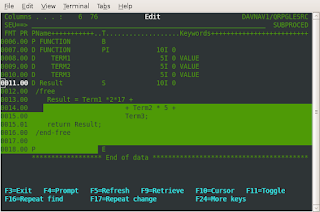
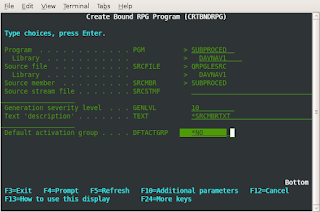
But default activation group(DFTACTGRP) as 'YES' throwing error while compiling, this can solveed giving as option 'NO'
not sure the reason for this ( need to investigate)
Activation group . . . . . . . . ACTGRP QILE
OUTPUT
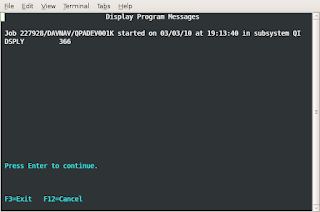
See little about free format.... we can write direct statements separated by semicolon in between /free ...and /end-free
Please refer :
Code400.com
Something more am trying to know about procedure,subprocedure,service program. While googling sample programs and I created one procedure in program. Iam not sure about the the other concepts now. Let me hack it later.
these procedures can be used like built-in functions:-)
http://publib.boulder.ibm.com/iseries/v5r2/ic2924/books/c092508410.htm
steps for creation:
(1)
A Prototype which specifies the name, return value if any, and parameters if any.
(2)
A Begin-Procedure specification (B in position 24 of a procedure specification)
(3)
A Procedure-Interface definition, which specifies the return value and parameters, if any. The procedure interface must match the corresponding prototype. The procedure-interface definition is optional if the subprocedure does not return a value and does not have any parameters that are passed to it.
(4)
Other definition specifications of variables, constants and prototypes needed by the subprocedure. These definitions are local definitions.
(5)
Any calculation specifications, standard or free-form, needed to perform the task of the procedure. The calculations may refer to both local and global definitions. Any subroutines included within the subprocedure are local. They cannot be used outside of the subprocedure. If the subprocedure returns a value, then the subprocedure must contain a RETURN operation.
(6)
An End-Procedure specification (E in position 24 of a procedure specification)
See sample program:
Rest of the code highlighted:

But default activation group(DFTACTGRP) as 'YES' throwing error while compiling, this can solveed giving as option 'NO'
not sure the reason for this ( need to investigate)
Activation group . . . . . . . . ACTGRP QILE

OUTPUT

See little about free format.... we can write direct statements separated by semicolon in between /free ...and /end-free
Please refer :
Code400.com
Friday, February 26, 2010
RPG flaw in addition
There is flaw in RPG addition , RPG programmers must have to aware of that. If you have twp variable length 2 and the sum is also length 2 then if the real result of addition has 3 digits it will truncate the left most digit rather than throwing an overflow in addition.
See the result:
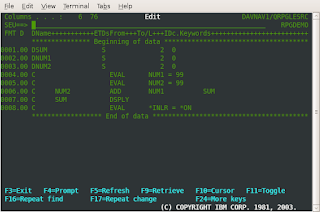
output
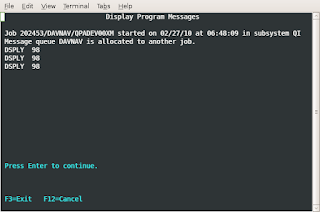
See the result:

output

Monday, February 22, 2010
SETLL
see in publib boulder ibm
http://publib.boulder.ibm.com/iseries/v5r1/ic2924/books/c0925083713.htm
CHGPF http://search400.techtarget.com/tips/index/0,289482,sid3_tax2f9,00.html
http://publib.boulder.ibm.com/iseries/v5r1/ic2924/books/c0925083713.htm
CHGPF http://search400.techtarget.com/tips/index/0,289482,sid3_tax2f9,00.html
When the structure of a physical file changes, most AS/400 programmers take the following steps to incorporate the change:
a. Change the DDS to reflect the new structure.
b. Make a copy of the data from the old structure file.
c. Delete any logical files based on the physical file.
d. Recompile the source and rebuild any logical files.
e. Copy the old data back to the new structure, specifying options *DROP and *MAP.
You can use the CHGPF command to achieve the same goal with less effort. When you need to recompile because of a change in file structure, follow these steps:
a. Make the necessary changes to the DDS source.
b. Type CHGPF and press F4 to display the screen below:
�������������������� Change Physical File (CHGPF)
� Type choices, press Enter.
� Physical file� . . . . . .��� ARETURNS�� Name
��� Library� . . . . . . . .����� INVLIB�� Name, *LIBL, *CURLIB
� System . . . . . . . . . .��� *LCL������ *LCL, *RMT, *FILETYPE
� Source file� . . . . . . .��� QDDSSRC��� Name, *NONE
��� Library� . . . . . . . .����� SRCLIB�� Name, *LIBL, *CURLIB
Enter the name of the physical file and the name of the library in which the file resides. Also type the source physical file name and the name of the library in which the source file resides.
c. Press Enter to display the screen below:
�������������������� Change Physical File (CHGPF)
� Type choices, press Enter.
� Physical file� . . . . . . .� ARETURNS�� Name
��� Library� . . . . . . . . .��� INVLIB�� Name, *LIBL, *CURLIB
� System . . . . . . . . . . .� *LCL������ *LCL, *RMT, *FILETYPE
� Source file� . . . . . . . .� QDDSSRC��� Name, *NONE
��� Library� . . . . . . . . .��� SRCLIB�� Name, *LIBL, *CURLIB
� Source member� . . . . . . .� *FILE����� Name, *FILE
� Source listing options . . .������������ *SRC, *NOSRC,*SOURCE...
���������������� + for more values
� Generation severity level� .� 20�������� 0-30
� Flagging severity level� . .� 0��������� 0-30
� Delete dependent logical file *NO������� *NO, *YES
� Remove constraint� . . . . .� *RESTRICT� *RESTRICT, *REMOVE
� Expiration date for member .� *NONE����� Date, *SAME, *NONE
Enter the source member name, and press Enter. This step recompiles the physical and logical files and copies data back. In fact, it does all the steps you've been doing manually.
Note that when you change the DDS to reduce a field's size or drop a field, you may receive a message warning that you may lose your data. You can ignore the message by responding to it with I(gnore).
You can use a similar technique to delete all the logical files based on a physical file. Rather than using the DSPDBR command to find all dependent logicals and then deleting them one by one, simply use the CHGPF command as described above and specify *YES for "Delete dependent logical file" on the second screen to delete all dependent files.
Saturday, February 20, 2010
CHAIN AND SETLL -- RPGLE
Where to use SETLL and CHAIN
If the programmer is using SETLL and READE to get a single record you could change the program to CHAIN and get quicker results. The SETLL and READE is good only for situations where you need to read a group of records with the same propertie
The below program is for fetching Employee Name and Employee Salary based on the Employee Number Entered through the screen.
Based on the input ( Employee Nmber - EMPIDS ) the CHAIN opcode will directly point to the record . READE will read that records and passing the values to Screen variables ... quite easy and simple.
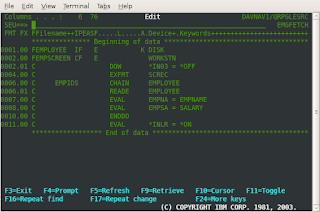
I will publish the SETLL program in the next------------------------------
If the programmer is using SETLL and READE to get a single record you could change the program to CHAIN and get quicker results. The SETLL and READE is good only for situations where you need to read a group of records with the same propertie
The below program is for fetching Employee Name and Employee Salary based on the Employee Number Entered through the screen.
Based on the input ( Employee Nmber - EMPIDS ) the CHAIN opcode will directly point to the record . READE will read that records and passing the values to Screen variables ... quite easy and simple.

I will publish the SETLL program in the next------------------------------
Saturday, February 13, 2010
RPGLE - Compile Time Array
After a long struggle on Compile time array , I defined an array . The problem was while initializing compile time array at the end of the program .( actually we need to take shift+F7 and give values)
Compile time array get populated at the time compilation of the code.Mostly these type of array use for error message display.
** and then data in successive lines at the bottom of the source.Below example we have defined an COMARR compile time array using CTDATA

OUTPUT:
======

The COMARR compile time array data we can hard code as row wise. But while declaring we have to specify how many values entering per row . Below example entering 5 records ( all the array values) per row. Keyword PERRCD(5)

OUTPUT:
=====

Compile time array get populated at the time compilation of the code.Mostly these type of array use for error message display.
** and then data in successive lines at the bottom of the source.Below example we have defined an COMARR compile time array using CTDATA
OUTPUT:
======
The COMARR compile time array data we can hard code as row wise. But while declaring we have to specify how many values entering per row . Below example entering 5 records ( all the array values) per row. Keyword PERRCD(5)
OUTPUT:
=====
Thursday, February 11, 2010
RPGLE - Runtime Array
In RPGLE the array concept same as collection of same data type. But it is classified according to time of intialization.
Runtime array got populated while program running
While declaring runtime array we have to specify the size of the array ( Dimension ):
See below sample program:
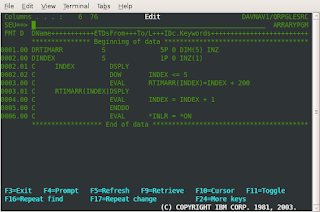
OUTPUT:
=======

Runtime array got populated while program running
While declaring runtime array we have to specify the size of the array ( Dimension ):
See below sample program:

OUTPUT:
=======

Wednesday, February 10, 2010
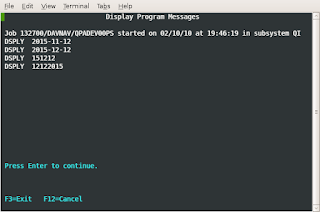
Convert date format RPGLE
A variable can be declared as date data type using 'D' in internal data type.

C ....*USA....... MOVE.......Datetemp.....Dat
C .... Dat ...... DSPLY....
Dat declared as 8 D ( date data type with 8 length ) to compact with *USA format
OUTPUT:
======
Character (A)
Graphic (G)
Numeric - Integer format (I)
Numeric – Packed decimal format (P)
Numeric - Zoned format (S)
Numeric - Unsigned format (U)
Float (F)
Date (D)
Time (T)
Timestamp (Z)
C ....*USA....... MOVE.......Datetemp.....Dat
C .... Dat ...... DSPLY....
Dat declared as 8 D ( date data type with 8 length ) to compact with *USA format
OUTPUT:
======

Character (A)
Graphic (G)
Numeric - Integer format (I)
Numeric – Packed decimal format (P)
Numeric - Zoned format (S)
Numeric - Unsigned format (U)
Float (F)
Date (D)
Time (T)
Timestamp (Z)
Shifting to tn5250
I got another terminal for logging into iSeries from ubuntu through just 'tn5250'. The GREEN screens makes more feeling that I am working in AS400 :-)
This has given by the http://www.rzkh.de/ as400 service administrators
See wiki.
http://en.wikipedia.org/wiki/IBM_5250
This has given by the http://www.rzkh.de/ as400 service administrators
See wiki.
http://en.wikipedia.org/wiki/IBM_5250
Tuesday, February 9, 2010
RPGLE - Concatenate two strings,addition

Simple programs are always helpful to get good step to learn a new language. See below how easy this is to write RPGLE ( am learning from basic ) rather than jumping to big things
INZ keyword is used to initialize the 'surname' and 'forename'. But before concatenating the variables using 'CAT' the valued changed using EVAL opcode.
Addition can be done using 'ADD'.
Arithmetic operations:
http://publib.boulder.ibm.com/infocenter/iadthelp/v7r0/index.jsp?topic=/com.ibm.etools.iseries.langref.doc/evferlsh354.htm
Monday, February 8, 2010
AS400 questions and answers refer
this is really good to learn extra about as400
http://www.aired.in/2009/12/ibm-as-400-interview-questions-and.html
http://www.aired.in/2009/12/ibm-as-400-interview-questions-and.html
Wednesday, February 3, 2010
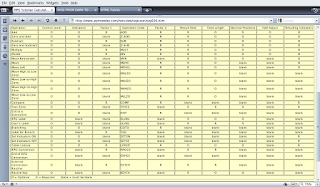
RPG opcode screen
Op-Code -- Purpose
ACQ -- Acquire device
BEGSR -- Begin Subroutine
CALLP -- Call Prototyped Procedure or Program
CHAIN -- Retrieve Record by key
CLEAR -- Clear
CLOSE -- Close File
COMMIT -- Commit Database changes
DEALLOC -- Release Dynamically Allocated Storage
DELETE -- Delete Record
DOU -- Do Until
DOW -- Do While
DSPLY -- Display message
DUMP -- Dump Program
ELSE -- Else
ELSEIF -- Else If
ENDyy -- End a Structured Group (where yy = DO, FOR, IF, MON, SL, or SR)
EVAL -- Evaluate expression
EVALR -- Evaluate expression and right adjust result
EXCEPT -- Perform Exception Output
EXFMT -- Write/Then Read Format from display
EXSR -- Execute Subroutine
FEOD -- Force End of Data
FOR -- For
FORCE -- Force specified file to be read on next Cycle
IF -- If
IN -- Retrieve a Data Area
ITER -- Iterate
LEAVE -- Leave a Do/For Group
LEAVESR -- Leave a Subroutine
MONITOR -- Begin a Monitor Group
NEXT -- Next
ON-ERROR -- Specify errors to handle within MONITOR group
OPEN -- Open File for Processing
OTHER -- Start of default processing for SELECT group
OUT -- Write Data Area
POST -- Post
READ -- Read a record
READC -- Read next changed record
READE -- Read next record with equal Key
READP -- Read prior record
READPE -- Read prior record with equal Key
REL -- Release
RESET -- Reset
RETURN -- Return to Caller
ROLBK -- Roll Back uncommitted database changes
SELECT -- Begin a Select Group
SETGT -- Position database to record with key greater than specified key
SETLL -- Position database to record with key not greater than specified key
SORTA -- Sort an Array
TEST -- Test Date/Time/Timestamp
UNLOCK -- Unlock a Data Area or Release a Record
UPDATE -- Modify Existing Record
WHEN -- Condition test within SELECT group
WRITE -- Write New Record
ACQ -- Acquire device
BEGSR -- Begin Subroutine
CALLP -- Call Prototyped Procedure or Program
CHAIN -- Retrieve Record by key
CLEAR -- Clear
CLOSE -- Close File
COMMIT -- Commit Database changes
DEALLOC -- Release Dynamically Allocated Storage
DELETE -- Delete Record
DOU -- Do Until
DOW -- Do While
DSPLY -- Display message
DUMP -- Dump Program
ELSE -- Else
ELSEIF -- Else If
ENDyy -- End a Structured Group (where yy = DO, FOR, IF, MON, SL, or SR)
EVAL -- Evaluate expression
EVALR -- Evaluate expression and right adjust result
EXCEPT -- Perform Exception Output
EXFMT -- Write/Then Read Format from display
EXSR -- Execute Subroutine
FEOD -- Force End of Data
FOR -- For
FORCE -- Force specified file to be read on next Cycle
IF -- If
IN -- Retrieve a Data Area
ITER -- Iterate
LEAVE -- Leave a Do/For Group
LEAVESR -- Leave a Subroutine
MONITOR -- Begin a Monitor Group
NEXT -- Next
ON-ERROR -- Specify errors to handle within MONITOR group
OPEN -- Open File for Processing
OTHER -- Start of default processing for SELECT group
OUT -- Write Data Area
POST -- Post
READ -- Read a record
READC -- Read next changed record
READE -- Read next record with equal Key
READP -- Read prior record
READPE -- Read prior record with equal Key
REL -- Release
RESET -- Reset
RETURN -- Return to Caller
ROLBK -- Roll Back uncommitted database changes
SELECT -- Begin a Select Group
SETGT -- Position database to record with key greater than specified key
SETLL -- Position database to record with key not greater than specified key
SORTA -- Sort an Array
TEST -- Test Date/Time/Timestamp
UNLOCK -- Unlock a Data Area or Release a Record
UPDATE -- Modify Existing Record
WHEN -- Condition test within SELECT group
WRITE -- Write New Record

RPGLE Built in function reference
RPGLE Dreamers built -in functions:
===================================
%ABS - Absolute Value of Expression
%ADDR - Get Address of Variable
%ALLOC - Allocate Storage
%CHAR - Convert to Character Data
%CHECK - Check Characters
%CHECKR - Check Reverse
%DATE - Convert to Date
%DAYS - Number of Days
%DEC - Convert to Packed Decimal Format
%DECH - Convert to Packed Decimal Format with Half Adjust
%DECPOS - Get Number of Decimal Positions
%DIFF - Difference Between Two Date, Time, or Timestamp Values
%DIV - Return Integer Portion of Quotient
%EDITC - Edit Value Using an Editcode
%EDITFLT - Convert to Float External Representation
%EDITW - Edit Value Using an Editword
%ELEM - Get Number of Elements
%EOF - Return End or Beginning of File Condition
%EQUAL - Return Exact Match Condition
%ERROR - Return Error Condition
%FLOAT - Convert to Floating Format
%FOUND - Return Found Condition
%GRAPH - Convert to Graphic Value
%HOURS - Number of Hours
%INT - Convert to Integer Format
%INTH - Convert to Integer Format with Half Adjust
%LEN - Get or Set Length
%LOOKUPxx - Look Up an Array Element
%MINUTES - Number of Minutes
%MONTHS - Number of Months
%MSECONDS - Number of Microseconds
%NULLIND - Query or Set Null Indicator
%OCCUR - Set/Get Occurrence of a Data Structure
%OPEN - Return File Open Condition
%PADDR - Get Procedure Address
%PARMS - Return Number of Parameters
%REALLOC - Reallocate Storage
%REM - Return Integer Remainder
%REPLACE - Replace Character String
%SCAN - Scan for Characters
%SECONDS - Number of Seconds
%SHTDN - Shut Down
%SIZE - Get Size in Bytes
%SQRT - Square Root of Expression
%STATUS - Return File or Program Status
%STR - Get or Store Null-Terminated String
%SUBDT - Extract a Portion of a Date, Time, or Timestamp
%SUBST - Get Substring
%THIS - Return Class Instance for Native Method
%TIME - Convert to Time
%TIMESTAMP - Convert to Timestamp
%TLOOKUPxx - Look Up a Table Element
%TRIM - Trim Blanks at Edges
%TRIML - Trim Leading Blanks
%TRIMR - Trim Trailing Blanks
%UCS2 - Convert to UCS-2 Value
%UNS - Convert to Unsigned Format
%UNSH - Convert to Unsigned Format with Half Adjust
%XFOOT - Sum Array Expression Elements
%XLATE - Translate
%YEARS - Number of Years
===================================
%ABS - Absolute Value of Expression
%ADDR - Get Address of Variable
%ALLOC - Allocate Storage
%CHAR - Convert to Character Data
%CHECK - Check Characters
%CHECKR - Check Reverse
%DATE - Convert to Date
%DAYS - Number of Days
%DEC - Convert to Packed Decimal Format
%DECH - Convert to Packed Decimal Format with Half Adjust
%DECPOS - Get Number of Decimal Positions
%DIFF - Difference Between Two Date, Time, or Timestamp Values
%DIV - Return Integer Portion of Quotient
%EDITC - Edit Value Using an Editcode
%EDITFLT - Convert to Float External Representation
%EDITW - Edit Value Using an Editword
%ELEM - Get Number of Elements
%EOF - Return End or Beginning of File Condition
%EQUAL - Return Exact Match Condition
%ERROR - Return Error Condition
%FLOAT - Convert to Floating Format
%FOUND - Return Found Condition
%GRAPH - Convert to Graphic Value
%HOURS - Number of Hours
%INT - Convert to Integer Format
%INTH - Convert to Integer Format with Half Adjust
%LEN - Get or Set Length
%LOOKUPxx - Look Up an Array Element
%MINUTES - Number of Minutes
%MONTHS - Number of Months
%MSECONDS - Number of Microseconds
%NULLIND - Query or Set Null Indicator
%OCCUR - Set/Get Occurrence of a Data Structure
%OPEN - Return File Open Condition
%PADDR - Get Procedure Address
%PARMS - Return Number of Parameters
%REALLOC - Reallocate Storage
%REM - Return Integer Remainder
%REPLACE - Replace Character String
%SCAN - Scan for Characters
%SECONDS - Number of Seconds
%SHTDN - Shut Down
%SIZE - Get Size in Bytes
%SQRT - Square Root of Expression
%STATUS - Return File or Program Status
%STR - Get or Store Null-Terminated String
%SUBDT - Extract a Portion of a Date, Time, or Timestamp
%SUBST - Get Substring
%THIS - Return Class Instance for Native Method
%TIME - Convert to Time
%TIMESTAMP - Convert to Timestamp
%TLOOKUPxx - Look Up a Table Element
%TRIM - Trim Blanks at Edges
%TRIML - Trim Leading Blanks
%TRIMR - Trim Trailing Blanks
%UCS2 - Convert to UCS-2 Value
%UNS - Convert to Unsigned Format
%UNSH - Convert to Unsigned Format with Half Adjust
%XFOOT - Sum Array Expression Elements
%XLATE - Translate
%YEARS - Number of Years
Tuesday, February 2, 2010
WHATS THE HELL IS THIS 'HAL' ?
Horrible days for me because while booting Ubuntu throws an error 'HAL not initialized'. I dont what the hell is that. But had a small google on that then understood it something very important 'Hardware Abstraction layer'
below gives aleast what that means http://packages.ubuntu.com/dapper/hal-device-manager
see the wiki http://en.wikipedia.org/wiki/Hardware_abstraction_layer
But enjoy learning from Linux
below gives aleast what that means http://packages.ubuntu.com/dapper/hal-device-manager
see the wiki http://en.wikipedia.org/wiki/Hardware_abstraction_layer
But enjoy learning from Linux
Creating DDS for Physical File (PF)
Physical file creation in AS400 (DDS)
Physical file is like a Table in the oracle database . Using select statments and RUNQRY its possible to access the table
step1: wrkmbrpdm ( in command line )
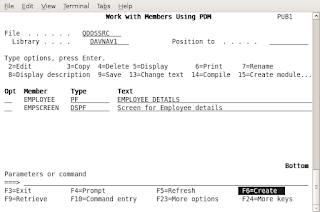
F6 option is for creating new DDS,RPG,CL etc
The source file for DDS is QDDSSRC and library for me it is DAVNAV1
Source member is the name of the Physical file and source type is PF( Physical file )
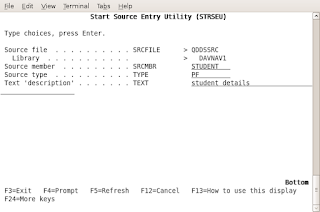
Now we are entering into the DDS creation. We have to follow below sequence
1. File level entries
2. record level entries
3. Field level entries
4. Key field lvel entries
step1:
The Functions(F4 - Prompt )- UNIQUE have used for keyword is used to indicate that the value of the key field in each record in the file must be unique ( duplicate records are not allowed )
step2:
In record row give the Name type - R and also the corresponding optional text also can be mention in the function field
step3:
The fields (analogy columns) can be mentioned in next line
step4:
Key field level entries is the last preceeding with 'K'
The DDS can be saved by typing 'FILE' in the top and enter
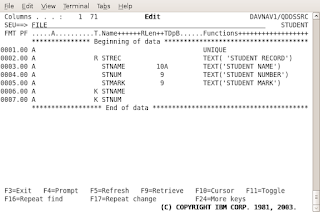
Compiling the DDS is easy using the option 14-Compile and errors can viewed through the spool files using 'SA' corresponding to the PF in screen
Entry
Meaning
A
Character
P
Packed decimal
S
Zoned decimal
B
Binary
F
Floating point
H
Hexadecimal
L
Date
T
Time
Z
Timestamp
Notes:
strsql from command
insert into student values ('Naveen',1000,50) 1 rows inserted in STUDENT in DAVNAV1.
Physical file is like a Table in the oracle database . Using select statments and RUNQRY its possible to access the table
step1: wrkmbrpdm ( in command line )

F6 option is for creating new DDS,RPG,CL etc
The source file for DDS is QDDSSRC and library for me it is DAVNAV1
Source member is the name of the Physical file and source type is PF( Physical file )

Now we are entering into the DDS creation. We have to follow below sequence
1. File level entries
2. record level entries
3. Field level entries
4. Key field lvel entries
step1:
The Functions(F4 - Prompt )- UNIQUE have used for keyword is used to indicate that the value of the key field in each record in the file must be unique ( duplicate records are not allowed )
step2:
In record row give the Name type - R and also the corresponding optional text also can be mention in the function field
step3:
The fields (analogy columns) can be mentioned in next line
step4:
Key field level entries is the last preceeding with 'K'
The DDS can be saved by typing 'FILE' in the top and enter

Compiling the DDS is easy using the option 14-Compile and errors can viewed through the spool files using 'SA' corresponding to the PF in screen
Entry
Meaning
A
Character
P
Packed decimal
S
Zoned decimal
B
Binary
F
Floating point
H
Hexadecimal
L
Date
T
Time
Z
Timestamp
Notes:
strsql from command
insert into student values ('Naveen',1000,50) 1 rows inserted in STUDENT in DAVNAV1.
AS400 machine learning
Its very difficult for me to study these IBM (iSeries)machines
http://en.wikipedia.org/wiki/IBM_System_i, but slowly am getting some basic findings .
Two weeks back I got access to one online AS400 machine through internet . So learning RPGLE ,CL and basic commands we can practice in my UBUNTU.
just telnet pub1.rzkh.de
then can start WRKMBRPDM ( work with members)
Tuesday, January 12, 2010
JOB SATISFACTION
Let me brief this word 'job satisfaction'
100 percentage saturation in the word 'JOB' is achievable or not ? I would say horribly unanswerable question.
Most of the students( case of Me too ) reaching MNC s and sells their brain to silly things ..simply silly things or keeps most of the time their brain in switch off state.
Sometimes I feel salary matters, but someone like me coming from Electronics background and trying to expertise in MS excel or something , pains me why i have studied 4 years in Btech. What is the meaning of Btech ....
But of course I am sure that there are solution to overcome this by selecting good career path and doing something effective or good .But I am not sure whether it is achievable for me. May this is because I like this idle state more than going for a risk.
If you are doing something with Full mind and getting preferable outcome and benefit , then its a state of satisfaction or saturation. ( This is my definition for satisfaction )
May I show you some cases of this :
1. Doing something with full mind and not getting enough outcome ( really discouraging feeling )
2. Not getting full mind to do thing, may be because the feeling of nothing gains from present work, can not expertise in this field or very poor idea on the present work etc
Sometimes I feel why I can't find out the correct path .. what I know ? Nothing I know to do myself . But I have some in built abilities , may be those can not make much output as money .. but I would like to say those works I likes more .
But I am hearing lot of advise like if we try to put full mind and effort , it will produce more outcome and satisfaction .. try to expertise in the current working field. But I am not sure that is correct or not.
Job satisfaction rate depends on individual, but much he utilize his brain and effort on his favorite area even though the outcome is less ..its somewhat manageable otherwise mind will not set anywhere .. that is what my experience
I will never ever leave my interesting areas and always try to learn something new ... at least I will keep this as my hobby that may increase my mind satisfaction level.
Saturday, August 22, 2009
"should I learn C++ or Java?"
This is the question coming to my mind when I am reaching 2 year software experience . Some days I will get some energy to learn again. Today is something like that . While searching through Swaroop blog http://www.swaroopch.com/posts/ , I got some interesting links ... Let me share this as I got some spark to learn again .
In dreams now I am getting these questions ( really , not joking )
1. Should I learn C++ or Java ?
2. Do I need to go for master degrees , continue in Job ? .
3, whether Mtech or MBA ?
I don't know how to solve these . am very poor in decision making. Now I am getting a Joke from Pramode Sir. For last year main project we were not able to select one project , But we had three, four in our list . We asked Sir , he said ' Selecting a project will become a project ' . ( please ignore if you are not getting the joke)
Yea... similar kind of decision making stuff again in life. Which way ? ..
The links I got is really interesting .( ha ha, Yet I haven't finilized my way ). But just this is motivational or energetic .See this below.
A Career in Computing by Bruce Eckel => http://www.artima.com/weblogs/viewpost.jsp?thread=259358
education-without-mortgaging-your-life ==>
http://personalmba.com/education-without-mortgaging-your-life/
In dreams now I am getting these questions ( really , not joking )
1. Should I learn C++ or Java ?
2. Do I need to go for master degrees , continue in Job ? .
3, whether Mtech or MBA ?
I don't know how to solve these . am very poor in decision making. Now I am getting a Joke from Pramode Sir. For last year main project we were not able to select one project , But we had three, four in our list . We asked Sir , he said ' Selecting a project will become a project ' . ( please ignore if you are not getting the joke)
Yea... similar kind of decision making stuff again in life. Which way ? ..
The links I got is really interesting .( ha ha, Yet I haven't finilized my way ). But just this is motivational or energetic .See this below.
A Career in Computing by Bruce Eckel => http://www.artima.com/weblogs/viewpost.jsp?thread=259358
education-without-mortgaging-your-life ==>
http://personalmba.com/education-without-mortgaging-your-life/